SS IPTV Setup on Smart TV – Guide with Screenshots (Samsung & LG)
Two ways to add your BalkanHD+ list to SS IPTV: yourself with the M3U link, or with a code you send us on WhatsApp.
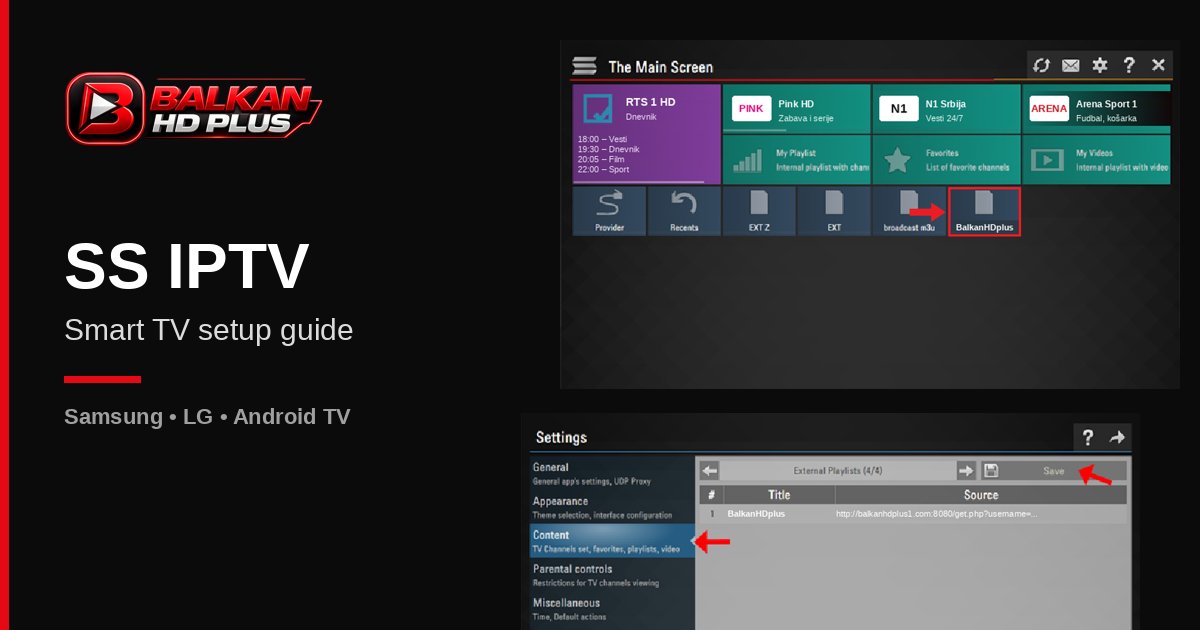
Note about apps: Your BalkanHD+ subscription does not include any app fees. Some apps are free, while others are paid separately to their developer. We are not affiliated with these app developers.
SS IPTV (Simple Smart IPTV) is a free app for Samsung and LG Smart TVs and one of the easiest ways to watch BalkanHD+ channels right on your television, with no extra box. You can add the channel list in two ways: yourself, by entering the M3U link in the settings, or with a short code you send us on WhatsApp so we load the list for you. Both methods are shown step by step with screenshots below.
Before you start
- A Smart TV – Samsung or LG connected to the internet. On some models and in some countries SS IPTV is not in the store; in that case use Nanomid Player or Smart IPTV.
- Your M3U link, which we send on WhatsApp after activation, for example: http://balkanhdplus1.com:8080/get.php?username=...&password=...&type=m3u_plus
- A stable connection – 15–20 Mbps is enough for HD. See how much internet you need for IPTV.
Step 1: Install SS IPTV
On a Samsung TV open Apps; on LG open the LG Content Store. Search for “SS IPTV” and install it. Accept the terms on first launch and you will land on The Main Screen.
Method 1 (recommended): add the M3U link yourself
This is the fastest way – two minutes and you do not depend on anyone. Typing is easiest if you first send the link to your phone and copy it from there.
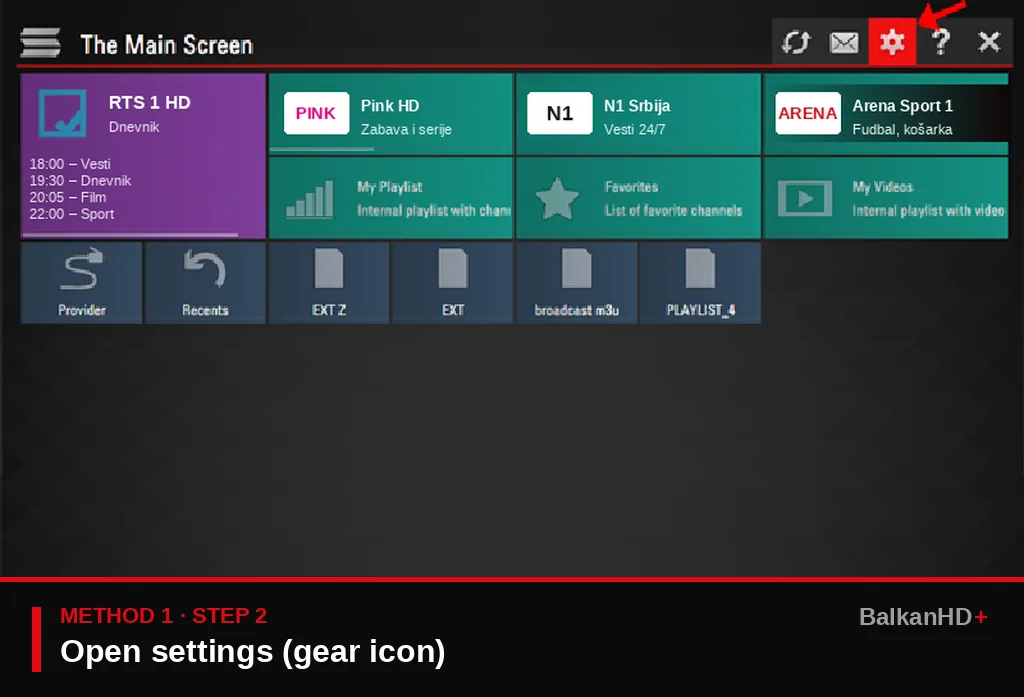
Step 2: Open settings
On the main screen move to the gear icon in the top right with your remote and press OK.
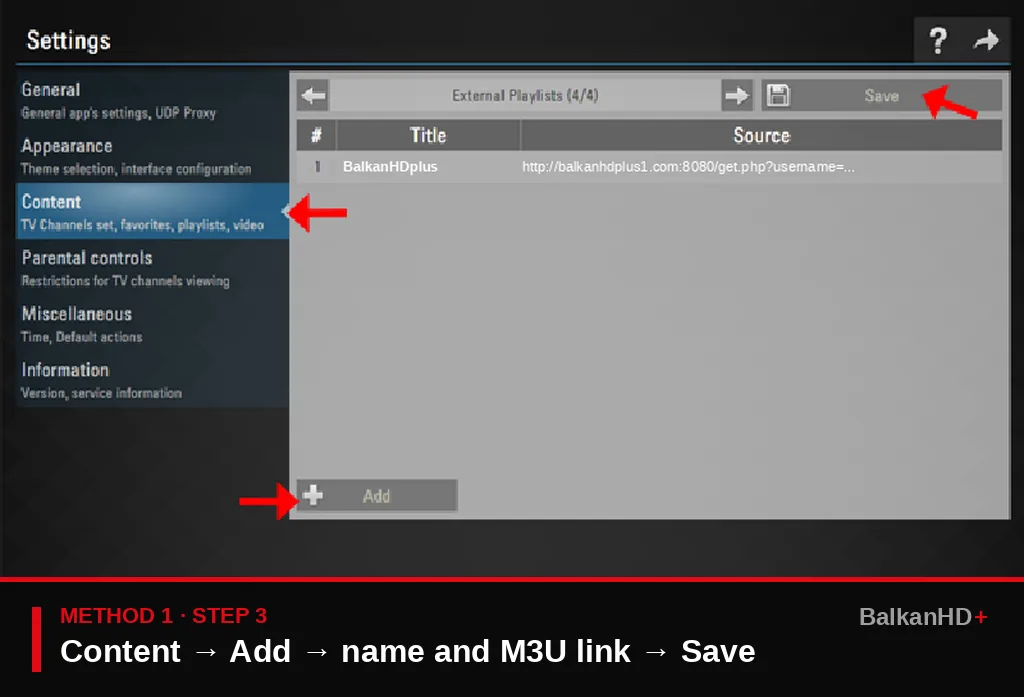
Step 3: Content → External Playlists → Add
Choose Content on the left, then Add at the bottom. Type BalkanHDplus as the name and your M3U link in Source. Check the link starts with http:// and has no spaces, then press Save in the top right.
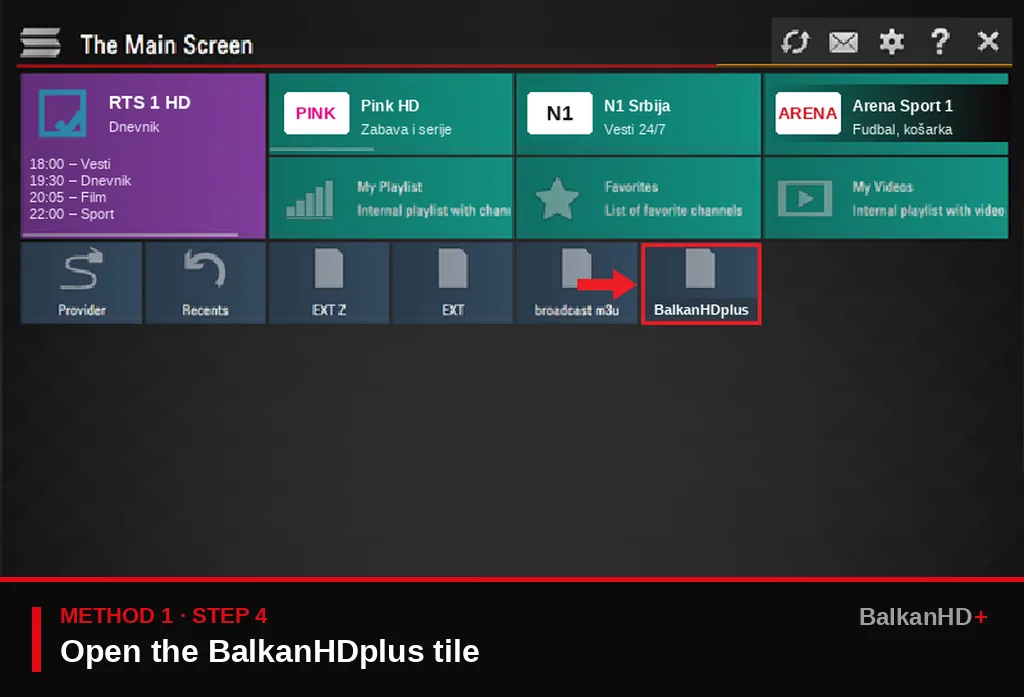
Step 4: Open the BalkanHDplus tile
Back on the main screen there is a new BalkanHDplus tile in the bottom row. Open it and you get every channel sorted by category – Serbia, Croatia, Bosnia, Montenegro, North Macedonia, sports and movies.
Ready to start?
First month €6. After that, €10/month or €100/year. No obligation to renew.
Method 2: with a code – we load the list for you
If you would rather not type a link with the remote, SS IPTV also has an internal playlist that is filled through its website. Handy for parents and grandparents: they send us the code on the screen and we do the rest.
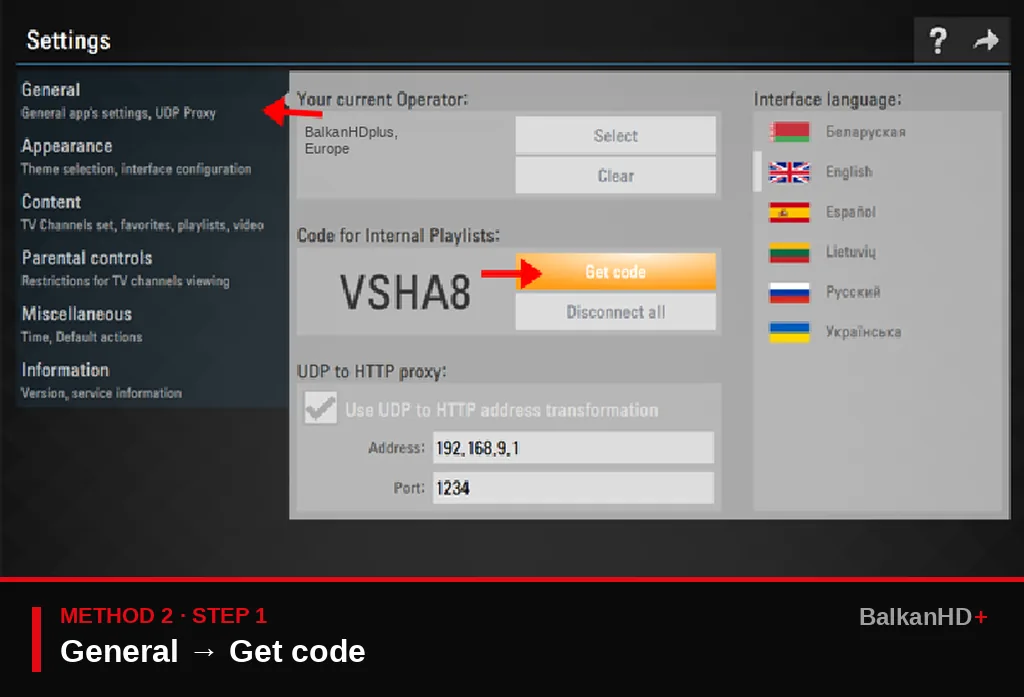
Step 1: General → Get code
In settings choose General and press Get code. A short code appears on screen (VSHA8 in the picture). The code is temporary, so use it straight away.
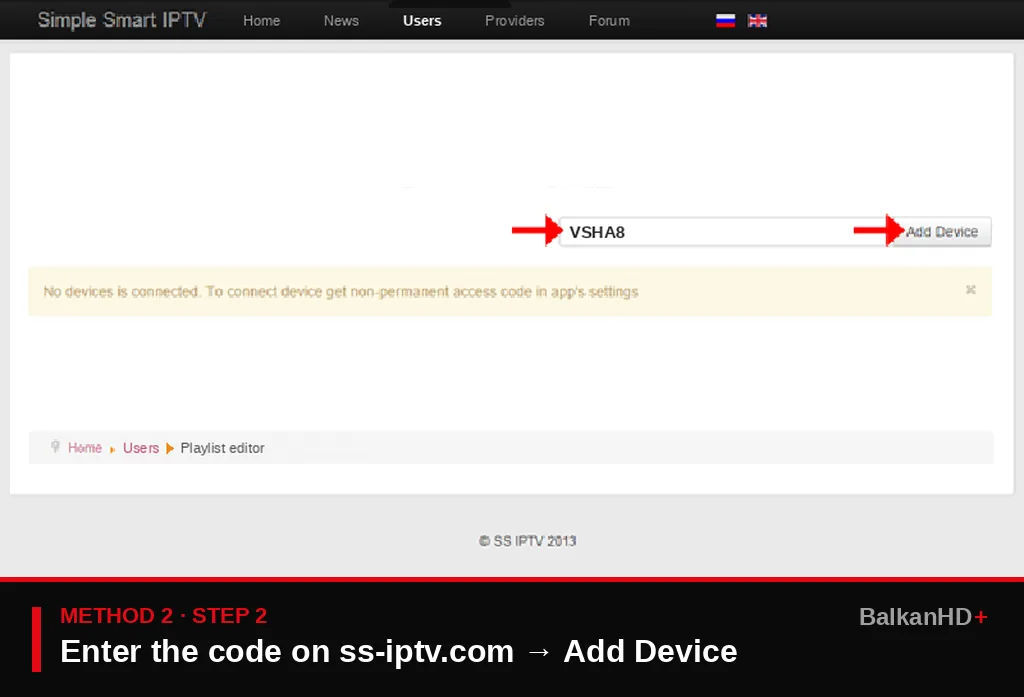
Step 2: Send us the code or enter it on the website
Easiest option: take a photo of the screen and send us the code on WhatsApp. To do it yourself, open ss-iptv.com/en/users/playlist on your phone or computer, enter the code and click Add Device. Then load the list in the editor and save it.
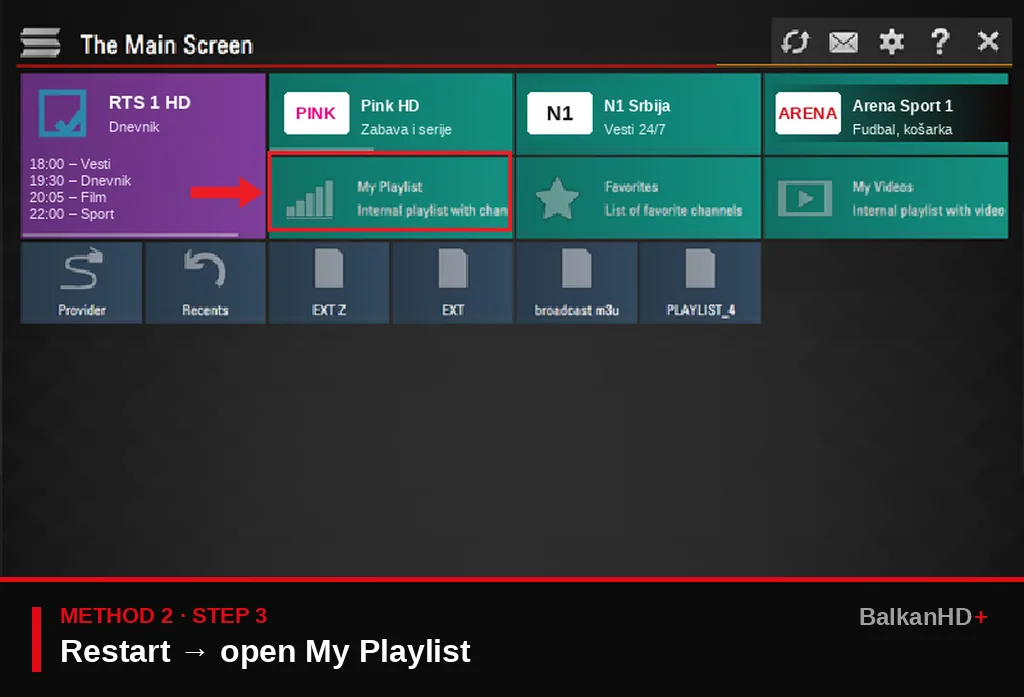
Step 3: Restart the app and open My Playlist
Close SS IPTV and start it again. Your channels are now on the My Playlist tile.
Common problems and fixes
The BalkanHDplus tile does not appear
Usually Save was not pressed before leaving settings. Go back to Content and check the list is saved.
The tile is there but empty or shows an error
There is a mistake in the link – one wrong character in the username or password is enough. Compare it with our message or send us a photo of the screen.
The website does not accept the code
The code has expired. Press Get code again under General and use the new one.
The picture freezes
A Smart TV on WiFi is the usual cause. Use a network cable if you can; more fixes in IPTV buffering – 12 solutions.
Frequently Asked Questions
Is SS IPTV free?
Yes, the app is free. You only pay for your BalkanHD+ subscription, which covers channels, movies and series.
Which method is better?
Method 1 (M3U link) is faster and the list refreshes by itself. Method 2 is best if you do not want to type the link – send us the code and you are done.
Can I add more than one list?
Yes. You can have several External Playlists, each with its own tile on the main screen. There is only one internal list (My Playlist).
What happens when I renew?
Nothing to change – the same link keeps working and the channels are back as soon as the subscription is renewed.
How much does BalkanHD+ cost?
You can start with a paid 6€ trial month. All packages are on the pricing page.
Ready to start?
First month €6. After that, €10/month or €100/year. No obligation to renew.
Different device? Read IPTV on Smart TV, IPTV Extreme for Android or browse all setup guides.